
Laptops play a crucial role in education, business operations and remote working environments. Students use laptops for online classes and research while professionals depend on them for meetings, documentation and collaboration. A reliable laptop enhances productivity, reduces downtime and allows users to manage tasks efficiently from anywhere, serving as the backbone of your IT infrastructure.
According to the Ministry of Statistics and Programme Implementation (MoSPI), only 9.9 percent of Indian households own a computer, including desktops and laptops, showing that computers are still uncommon in many homes despite rising internet use. This includes 21.6 percent in urban areas and just 4.2 percent in rural regions, reflecting a large gap in digital access between cities and villages.
When you plan to buy or rent a laptop, you often hear terms like processor, RAM, hard disc, graphics card, battery etc. These specifications decide how well a laptop performs. If you understand these components clearly, you can choose a laptop that actually matches your goals instead of relying just on brand names or pricing.
In this blog, we will explain laptop specifications that will help you choose the best laptop according to your goals.
How Laptops Work: The Basics
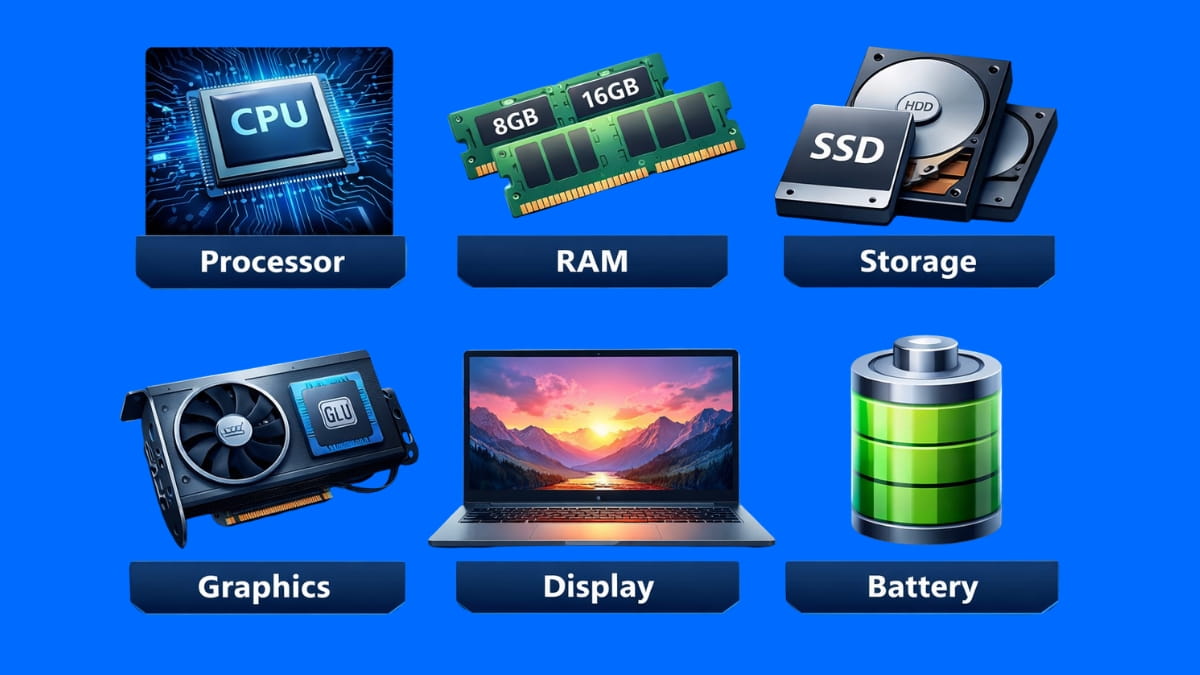
A laptop works by combining several hardware parts that function together to complete all the tasks smoothly. The main components include:
- Processor
- Memory
- Storage
- Graphics unit
- Display
- Battery
When you open an application, the processor handles instructions while the memory supports quick access to data. The storage keeps your files safe even after you switch off the laptop. The display shows visual output while the battery provides power.
How Laptop Usage Differs for Different Users
A government survey by MoSPI reported in 2024 that the ability to use computers varies widely in India, with only about one in five adults able to operate a computer, while urban areas show higher use and rural rates remain much lower, highlighting differences in digital skill levels.
A laptop is used differently depending on who is using it. That is because when the usage is different for everyone, the laptop requirements also change.
- A student may use a laptop for online classes, assignments, research and project work. They may need reliability and comfort for long study hours.
- An office worker uses a laptop for emails, video meetings, documentation and daily office tasks. They need smooth multitasking and stability during work hours.
- A creative professional (designer, video editor, content creator) – needs powerful Processor, higher RAM, dedicated GPU and high-quality display.
- A gamer – requires high-performance Processor, dedicated GPU and advanced cooling support.
Understanding the Processor
The processor, which is also known as the Central Processing Unit (CPU), is the main brain of the laptop or computer system. Your laptop depends on the processor to:
• Process instructions
• Run software
• Manage overall system performance
A faster processor helps you complete tasks like browsing, editing documents and using software smoothly. Meanwhile, the RAM (Random Access Memory) supports the processor by storing temporary data for active programs. When you have better RAM, your laptop can handle many applications at the same time easily
The processor directly impacts how fast a laptop responds to commands and completes tasks. That is because it handles all instructions in the background when you open applications, process data or perform calculations. A stronger processor ensures smoother performance and reduces delays during everyday usage.
- The processor manages tasks like document editing, emails and video meetings without interruptions for office work.
- The processor handles complex operations that require consistent processing power for technical or creative work.
Therefore, choosing the right processor helps you maintain stable performance and avoid frequent slowdowns during work.
For example, you can choose Intel Core i3, i5, i7 and i9 processors, which are arranged in increasing performance levels. However, it is also important to check the processor generation while selecting a laptop, as newer generations usually offer better speed, efficiency and improved architecture.
For instance, a 13th Gen Intel Core i3 can outperform a 7th or 8th Gen Intel Core i5 in everyday tasks because newer generations come with improved architecture, better efficiency and higher processing speeds.
Understanding RAM (Random Access Memory)
RAM (Random Access Memory) is the temporary memory that your laptop uses while applications are running. When you open software or browser tabs, the data loads into RAM so that the processor can access it quickly.
If your laptop has lower RAM size, it may slow down during heavy usage or multitasking situations. The applications may take longer to load and switching between programs may feel delayed.
Thus, having an adequate RAM ensures stable performance, reduces freezing issues and supports a smoother experience during daily work, study or entertainment activities.
- A laptop with 4GB RAM can manage basic tasks such as browsing and document editing but multitasking becomes difficult.
- An 8GB RAM laptop suits students and office users who run multiple applications at the same time.
- A 16GB RAM laptop supports professional work like editing, designing and coding with better stability.
- A 32GB RAM laptop is suitable for advanced users who handle heavy workloads such as large software projects or media processing.
Also, higher RAM capacity helps the laptop remain useful for several years, as modern applications gradually demand more memory over time.
RAM alone does not decide performance. When combined with a strong processor and fast storage like an SSD, it significantly improves speed, responsiveness and overall efficiency.
Balanced hardware always delivers better performance than focusing on RAM alone. When the RAM becomes full, the system uses virtual memory, which is a portion of storage that acts as backup memory. Although this helps keep the laptop running, it is slower than physical RAM. Therefore, having sufficient RAM ensures smoother and more efficient performance.
Understanding Storage: HDD, SSD, and NVMe
Storage is the place where your laptop saves files, applications and the operating system permanently.
- The traditional hard disk drives are mechanical and slower but they are cheaper and offer large storage space.
- On the other hand, the solid-state drives (SSD) store data on memory chips. This helps the laptop start faster and load files continuously.
- Similarly, the NVMe storage is an advanced type of solid-state drive that offers even higher speed for demanding tasks.
The storage size determines how many applications, documents, images, videos and system files you can store on the laptop at one time.
- A 256GB storage option is good for you if you use the laptop for basic work and save most files online.
- A 512GB storage option gives you enough space for daily use, office work and personal files.
- A 1TB storage option is best for you if you often handle large files like videos, designs or software projects.
Some laptops support additional internal storage slots or allow the use of external storage devices when space becomes limited. This flexibility is useful for users whose data requirements increase over time. The hybrid storage solutions combine HDD for larger storage capacity and SSD for faster performance which offers a practical balance between SSD for speed and HDD for cost.
Basically, storage speed affects how quickly the laptop starts, loads applications and accesses files. So, faster storage allows the operating system to boot quickly and reduces waiting time while opening software.
Understanding the GPU (Graphics Processing Unit)
The GPU handles visual tasks such as image display, video playback, and graphic rendering.
- The integrated graphics are built into the processor and are suitable for basic tasks like watching videos or casual design work. It shares system RAM.
- The dedicated graphics cards offer higher performance for gaming, video editing and 3D applications.
If you use creative software or play games, a dedicated GPU helps deliver smoother visuals. The integrated graphics usually provide sufficient performance without increasing cost or power consumption for regular office and study tasks.
Laptop Displays
The display of your laptop affects how comfortable you feel while using it for long hours. The higher resolution displays offer better text readability and image quality. The panel type also matters because it affects viewing angles and colour accuracy. A good display reduces eye strain during work and entertainment. When you select a laptop, choosing one with a good display improves both productivity and visual comfort.
Laptop Battery and Charging Basics
The laptop battery allows you to use the laptop without a constant power connection. The capacity of the battery decides how long the laptop runs on a single charge. The power efficiency also depends on:
- Processor type
- Display brightness
- Running applications
A reliable battery is important if you travel frequently or work remotely. So, you must understand battery performance as it helps you avoid frequent charging interruptions during the daily tasks.
How to Choose the Right Laptop for Your Needs
To help you choose the right laptop for your needs, we have discussed some steps below that will help you choose the right one for yourself:
Step 1:
You should first think about the main purpose of using the laptop in your daily life. If you mostly browse the internet, write documents, attend online meetings or watch videos, basic specifications will work well for you.
Step 2:
You need to consider whether your work involves simple tasks or professional activities. You do not need very high-performance hardware for regular office work and study. However, if you use design software, editing tools or technical applications, then strong processing power and better graphics support will suit you the best.
Step 3:
You should select the processor, RAM and storage based on your actual usage needs. These specifications help the laptop run smoothly without unnecessary issues. This way you can avoid paying extra for features that you may never use.
Step 4:
Your budget plays an important role in your final decision. You should decide how much you are comfortable spending before comparing options. A well-planned budget helps you get better long-term value without compromising on the essential features.
Step 5:
You should always compare your usage needs with the laptop specifications before making a purchase. When the laptop matches your work style and daily requirements, you feel more satisfied and confident with your decisions.
Conclusion
When you understand the specifications of a laptop, choosing the right one becomes easier. Simply, it helps you avoid confusion if you know how the processor, memory, storage, graphics and battery work together.
Buying lower configurations than required can make the laptop outdated quickly. At the same time, purchasing highly advanced hardware without an actual need can be unnecessarily expensive and may not provide practical value.
Choosing the right balance based on your real usage ensures better long-term satisfaction and cost efficiency.